
An independent guide
Order of the Sinking Star Gameplay & Getting Started
Order of the Sinking Star combines exploration with puzzles about moving characters and objects under different rules. From the Crossroads, choose a direction and learn its abilities through the early challenges. If stuck, you can undo a move, restart or return to the overworld through the menu. The reported PC defaults are WASD to move, Z to undo and R to restart; the controls reference below explains their scope.
- Coverage
- Beginner mechanics and exploration; no room solutions.
- Controls
- Third-party PC default bindings published October 8, 2026; exact current patch and console mappings are not established here.
Explore, then work on a local puzzle
The world connects individual challenges, so getting stuck in one room does not have to end your session. The official description explicitly allows revisiting worlds and returning to challenges at your own pace.
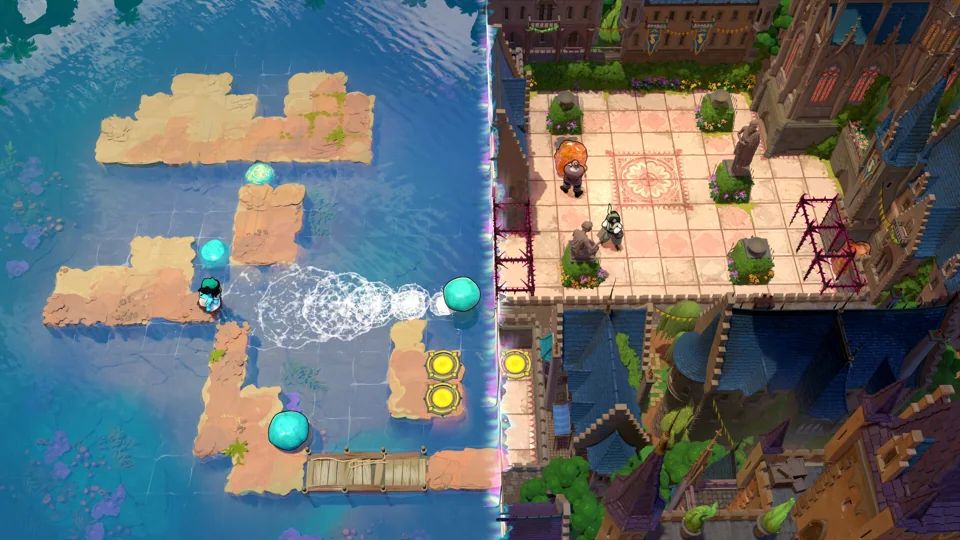
Within a puzzle, the useful question is what the selected character can move or change. Moving a stone, swapping positions or gaining a power from a beam changes the problem in different ways. The surrounding world becomes more involved as its puzzle systems begin to overlap.
Sources: Steam — official game description · Into Indie Games — Mahmud Munazil Rahman's beginner guide
Choose a direction by the rule you want to learn
Early puzzle approaches described in Into Indie Games' October 8 beginner guide. These are mechanics summaries, not solutions or a required order.
Scroll across to read every column.
| Direction | What you work with | What makes it different |
|---|---|---|
| North | A party of fantasy heroes | Switch between heroes whose pushing, pulling or swapping abilities differ. |
| East | Mirrors and reflections | Change position through reflections, including moving objects between islands. |
| South | Stones, water and islands | Move stones to make crossings; some puzzles involve timing. |
| West | Gems and colored beams | Stand in beams to gain powers, and plan around the caver's movement restrictions. |
If you want a gentler introduction, the guide's author recommends north or east. That is an attributed starting suggestion, not a rule that prevents you choosing south or west. The official game description leaves the exploration order open.
Sources: Into Indie Games — Mahmud Munazil Rahman's beginner guide · Steam — official game description
The first PC actions to learn
The following keys come from Anthony Manuel's launch-day PC controls reference. They describe defaults; they do not establish the layout of every platform or a remapped installation.
- Move with W, A, S and D.
- Use C or number keys 1–9 to switch characters when that action is available.
- X is listed as Primary Action. Its effect depends on the character and puzzle, so the label is not a promise that X always performs the same move.
- Shift is listed as Run; Alt as Speed Up Time; Ctrl as Run and Slow Time. The south-area guide describes slowing time for timing puzzles, rather than requiring fast reactions.
- For the remaining view and action bindings, use the controls reference.
Sources: Magic Game World — Anthony Manuel's PC and controller controls · Into Indie Games — Mahmud Munazil Rahman's beginner guide
Undo, restart or try a different challenge
- Undo — Z on the reported PC defaults
- Use the action labelled Undo to take back a move while working on a puzzle. It is a different operation from restarting the room.
- Restart — R on the reported PC defaults
- Use the action labelled Restart when you want to begin that puzzle again. The control reference identifies the action but does not document every possible save or progression effect.
- Return to the overworld — through the menu
- Into Indie Games describes leaving an area through the menu and returning to the Crossroads to choose another direction. Its guide does not give an exact menu-item label, so this page does not invent one.
Choose the recovery action that matches the problem: undo for an experiment you want to reverse, restart for a fresh puzzle attempt, or the overworld for a different challenge. This advice follows the documented actions; it does not promise a solution to any particular room.
Sources: Magic Game World — Anthony Manuel's PC and controller controls · Into Indie Games — Mahmud Munazil Rahman's beginner guide
Expect abilities to meet later
The four approaches begin separately, but the official description says that characters eventually meet and their puzzle systems intertwine. Learning a local rule is therefore useful beyond its first area.
For the differences between the named heroes and the restrictions on their abilities, see the character reference. That lookup expands the ability descriptions without turning this starting overview into a room walkthrough.
Sources: Steam — official game description · Into Indie Games — Mahmud Munazil Rahman's beginner guide
Sources and scope
- Steam — official game description
Steam Windows product 499170; exploration, character combinations and puzzle structure.
Research checked
- Into Indie Games — Mahmud Munazil Rahman's beginner guide
Original third-party guide published October 8, 2026; quadrant mechanics and returning to the overworld.
Research checked
- Magic Game World — Anthony Manuel's PC and controller controls
Original third-party default PC table published October 8, 2026; not official documentation or current-patch testing.
Research checked